Tutorial
How to make an AI UGC ad that looks real (the full prompt kit for a 15-second ad)
Lock your product, your creator and your place first, use one style header for every shot, then write the ad as a numbered shotlist. Every prompt I used for a 15-second skincare ad, ready to copy.

Most AI ads look fake for the same three reasons: the product changes shape between shots, the face changes from one cut to the next, and the light looks like a video game. The fix is not a better model. It's a better method.
This is the method I use, with every prompt of a real example: a 15-second UGC ad for a vitamin C serum, filmed "by" a creator in her bathroom in the morning. The ad at the top of this page was made with exactly these prompts and these three reference images, rendered with ComfyUI on a local GPU. No voice: only the small sounds of each gesture, a quiet room and soft music. And it is shown exactly as it came out: no colour correction, no grading, no retouching, no editing. The light, the skin and the colours are straight from the generation.
Copy the prompts, change the product, and you have your own ad.
The whole idea fits in one line:
Lock the assets → one style header → numbered shots → edit with music.
Step 1 — Lock your assets before any video
Before you make a single video clip, you make reference images of everything that comes back in every shot. In this ad there are three: the product, the creator and the bathroom. Every video shot will use them as references, so the bottle and the face stay exactly the same from the first second to the last.
1.1 The product sheet
One image showing the product from every side, on a plain background. This is the most important image of the whole ad.
Product reference sheet, orthographic turnaround of one skincare bottle shown 4 times in a row: front view, left side view, back view, three-quarter view. A 30 ml amber glass dropper bottle with a white rubber bulb and a matte white collar. A minimal off-white paper label wrapped around the middle with the brand name "NOUR" in a thin black sans-serif, and below it "Vitamin C Serum 15%" in small text. The liquid inside is clear golden orange. Studio product photography, plain light grey seamless background, soft even light from above, very soft contact shadow under each bottle, true-to-life colours, sharp focus, high detail, no props, no hands, no reflections of people, no extra text, no watermark.
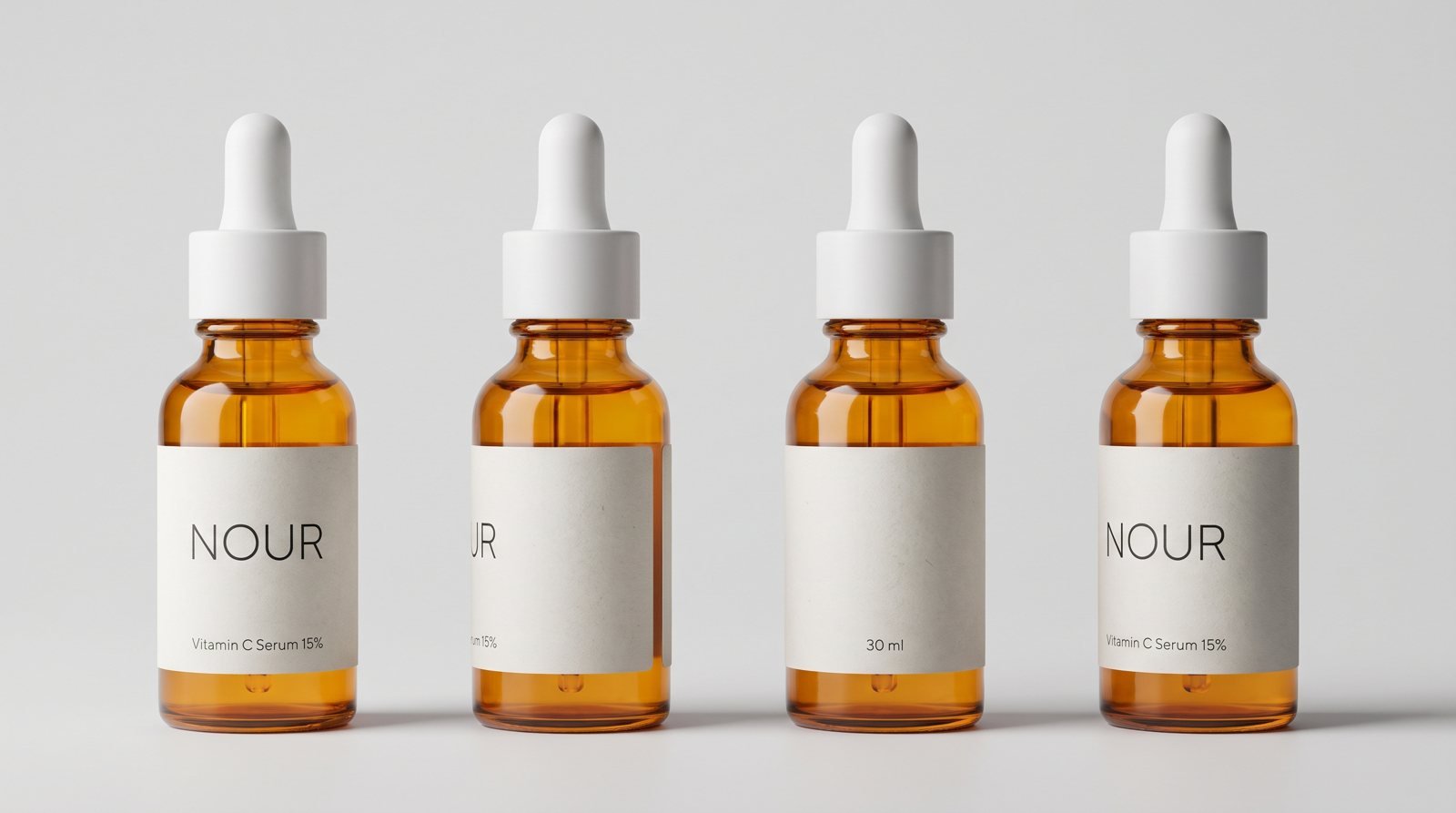
Tip: if your real product exists, use its real photos instead. Put your bottle on a grey background and take 4 photos from 4 sides. Real always beats generated for the product.
1.2 The creator sheet
One image with the face up close and the full body from the front and the back, on grey. This keeps her face, hair and clothes identical in every shot.
Character reference sheet on a plain neutral grey background, split into three panels side by side. Left panel: head and shoulders close-up of a 26-year-old Tunisian woman, warm olive skin with natural texture and a few small freckles on the nose, dark brown eyes, thick natural eyebrows, long dark brown wavy hair loosely tied in a low messy bun with a few strands around the face, no makeup or very light makeup, small gold hoop earrings, relaxed friendly expression. Middle panel: the same woman full body, front view, standing straight, arms relaxed, wearing a soft cream oversized cotton t-shirt and light grey pyjama trousers, barefoot. Right panel: the same woman full body, back view, same clothes and same bun. Natural soft daylight, realistic skin with pores, photographic, 85 mm portrait look, consistent face and identity across all three panels, no text, no logo, no watermark.
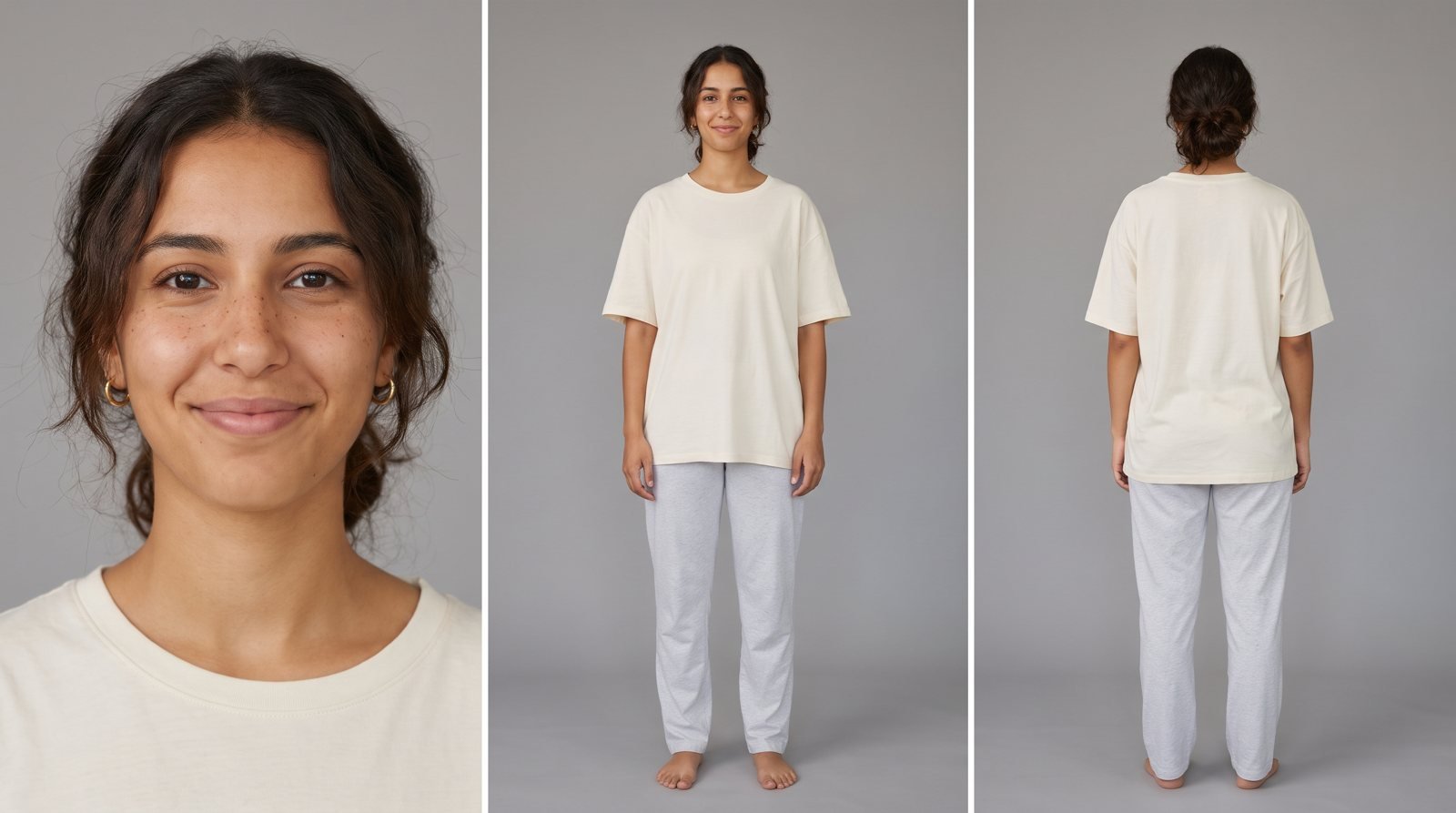
Check the result carefully: if the face is not the same in the three panels, generate again. One wrong sheet and the whole ad drifts.
Pro tip — lock one face
A sheet with two faces on it confuses the video model: it doesn't know which one to follow, and the face drifts from shot to shot. So keep one face only, the close-up on the left, and erase the face from the full-body front view in the middle. The back view already has no face.
Run this as an edit on the sheet you just made (not a new image):
Erase the face from the middle panel only shot.
Yes, that short. I tried a long, detailed version first and it failed: the model changed other parts of the sheet. For small edits like this one, a short and direct instruction works better than a long one.
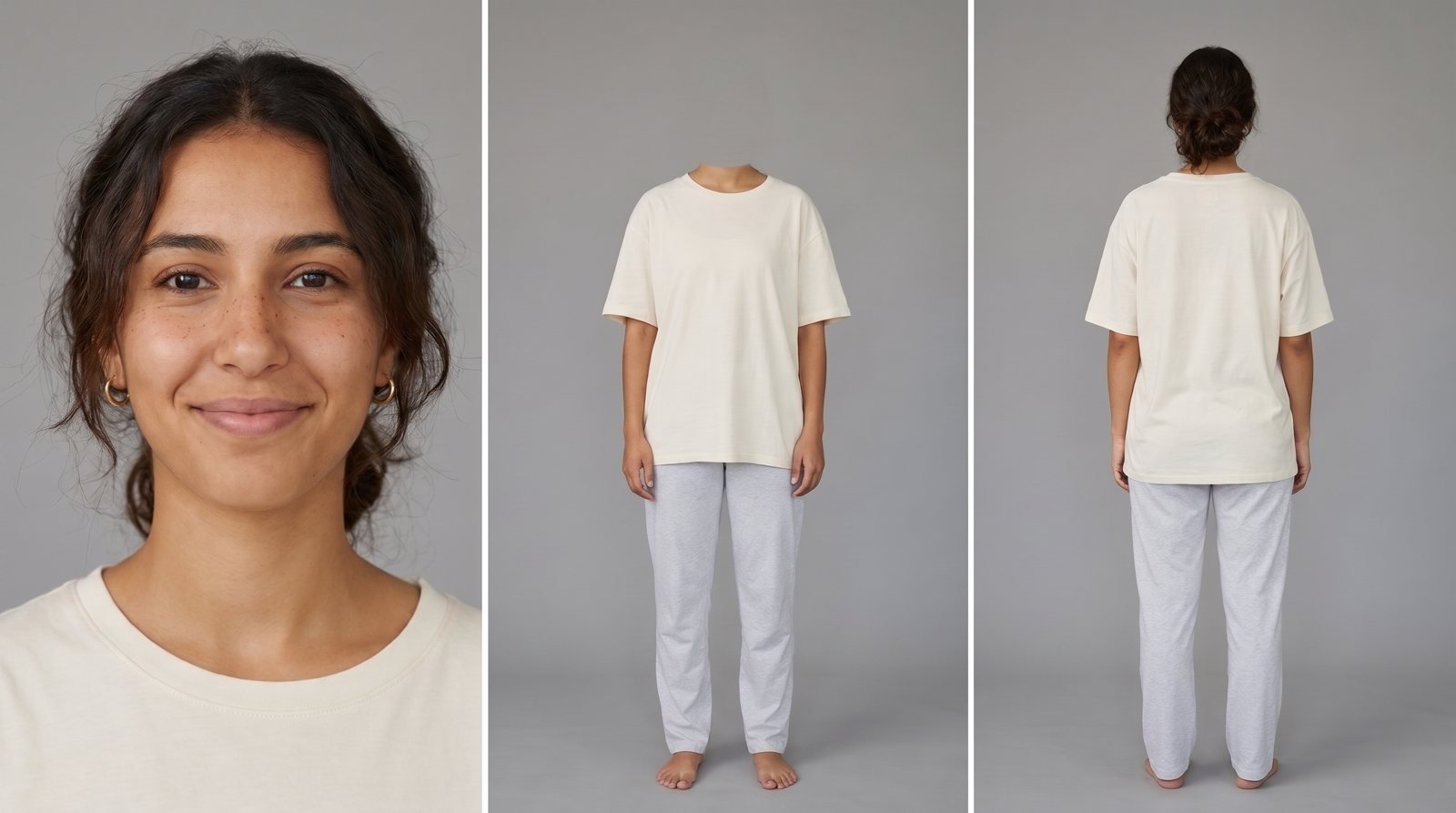
Check the result: the left panel must still show her face exactly as before, and the middle panel must show the body with no face. Use this cleaned sheet as the creator reference in every shot. If your ad has a second person (a friend, a coach, a shop owner), make their sheet the same way and clean it the same way: one face per sheet.
1.3 The place
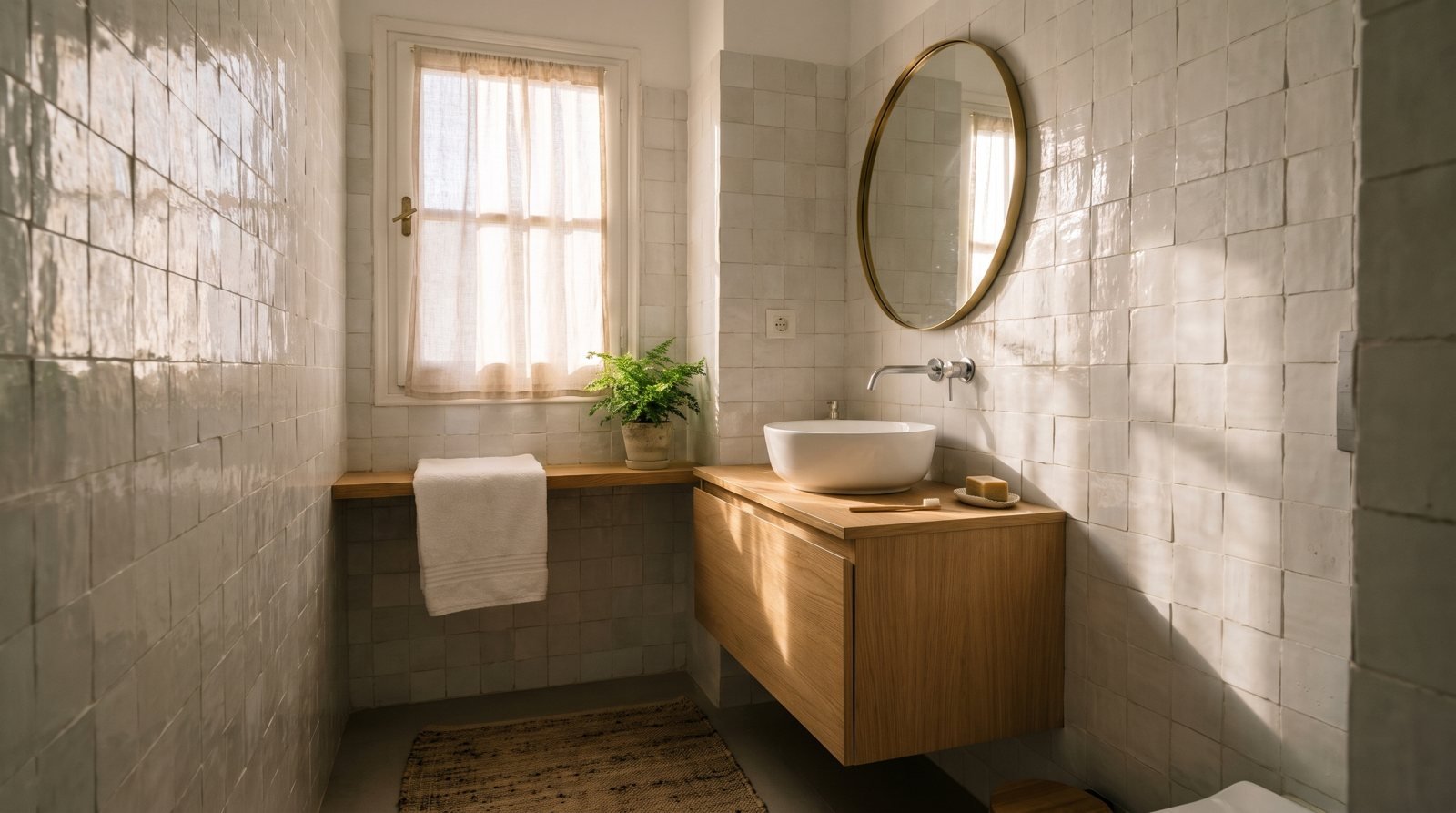
The bathroom, shown at a three-quarter angle so it has depth.
Interior reference photo of a small modern bathroom in a Tunis apartment in the early morning, seen from a three-quarter angle at eye level. White zellige tiles with slightly uneven glossy surfaces, a light oak vanity with a white ceramic basin, a round mirror with a thin brass frame, a small window on the left with a sheer linen curtain letting in soft warm morning sunlight, a folded white towel and a small green plant on the shelf. Natural daylight only, gentle shadows, no artificial lamps turned on, tidy but lived-in, realistic photograph, 24 mm lens, no people, no text, no watermark.
Step 2 — Write one style header for the whole ad
This block goes at the top of every video prompt, word for word. It's what makes six separate clips look like one ad filmed with one phone.
STYLE: Vertical 9:16 UGC smartphone video, filmed by the creator herself on a phone, handheld with small natural hand movement, slight phone-camera wide lens, natural morning daylight from the window only, no studio lights, no backlight, no rim light, soft realistic shadows. Warm natural colours, true skin tones with visible pores and texture, no beauty filter, no plastic skin. Calm, honest, everyday mood. The serum bottle matches the product reference exactly (same shape, label, colours). The woman matches the character reference exactly (same face, hair in a low messy bun, cream t-shirt). The bathroom matches the location reference. Continuity: same hair, same clothes, same light direction in every shot. Realistic physics for liquid and hands. 24 fps. No on-screen text, no logos added, no subtitles.
Change it once if you want a different feel (a gym, a café, an evening light), and every shot follows.
Step 3 — The shotlist: 15 seconds, 6 shots
Each shot is a short prompt: the style header + what we see + the camera + the action. Use the three reference images in every shot. If your tool works from images, make the first frame of each shot as a still image first (same prompt), check it, then animate it.
| # | Time | Shot |
|---|---|---|
| 1 | 0 – 2.5 s | Selfie hook: she holds the bottle next to her face and talks to the camera |
| 2 | 2.5 – 5 s | Close-up: the dropper pulls up the golden serum |
| 3 | 5 – 8 s | Two drops on her cheek, she pats them in |
| 4 | 8 – 10.5 s | Macro of the skin glowing in the window light |
| 5 | 10.5 – 13 s | She smiles and turns the label to the camera |
| 6 | 13 – 15 s | The bottle on the basin edge, room for your logo |
Shot 1 — The hook (0 – 2.5 s)
[STYLE HEADER]
Shot 1, 2.5 seconds. Front-facing selfie framing, her face and shoulders fill the frame, phone held at arm's length slightly above eye level. She stands in front of the bathroom mirror area, morning light on the left side of her face. She lifts the serum bottle next to her cheek with the label facing the camera, raises her eyebrows and starts talking to the camera with a small honest smile, like telling a friend a secret. Natural lip movement, small head movement, slight handheld shake.
Shot 2 — The serum (2.5 – 5 s)
[STYLE HEADER]
Shot 2, 2.5 seconds. Close-up from her point of view, her hand in frame. She unscrews the dropper and slowly lifts it out of the bottle; the clear golden orange serum fills the glass pipette and one drop forms at the tip, catching the window light. Shallow depth of field, the bathroom softly blurred behind. Slow steady movement, realistic liquid.
Shot 3 — Applying it (5 – 8 s)
[STYLE HEADER]
Shot 3, 3 seconds. Mirror-selfie angle, medium close-up of her face turned slightly to the right. She places two drops of serum on her right cheek, then gently pats them in with her fingertips, eyes half closed, relaxed. Window light from the left, soft shadow on the right side of her face. Natural skin texture, no filter.
Shot 4 — The glow (8 – 10.5 s)
[STYLE HEADER]
Shot 4, 2.5 seconds. Macro close-up of her cheek and jawline, the phone moves very slowly closer. The skin looks fresh and lightly dewy where the serum was applied, real pores and fine texture visible, a soft warm highlight from the window moves gently across the cheekbone as she turns her head a little toward the light.
Shot 5 — The product (10.5 – 13 s)
[STYLE HEADER]
Shot 5, 2.5 seconds. Selfie framing like shot 1, slightly closer. She smiles naturally at the camera and turns the bottle in her hand so the "NOUR" label faces the lens and stays sharp, then gives a small nod as if to say "trust me". Same hair, same t-shirt, same morning light.
Shot 6 — The end frame (13 – 15 s)
[STYLE HEADER]
Shot 6, 2 seconds. Static close shot, phone resting on the shelf. The serum bottle stands alone on the edge of the white basin, label facing the camera, sharp focus, the bathroom and window softly blurred behind, warm morning sunlight on the glass and a small soft reflection. The top third of the frame is calm and empty, leaving space for a logo and a price. Almost no movement, only the light shifting slightly.
Or render it in one take
Some video models take several reference images at once. In that case you don't need six clips: give the model the three references (creator with one face, product, bathroom) and one prompt that describes the 15 seconds beat by beat: "from 0 to 2.5 seconds…, from 2.5 to 5 seconds…". That's how the ad above was made, in one generation with sound.
Two things that made the difference:
- Write her emotions, not only her actions. Tired and unimpressed at the start, curious, relaxed while she applies it, quietly surprised by the glow, confident at the end. Without this, the face stays flat.
- Write the sounds one by one. The click of the dropper, the drops, the fingertip pats, the glass on the basin, a quiet room tone, soft music mixed low. And say clearly "no voice, no talking", more than once.
Step 4 — Edit it into one ad
- Put the 6 clips in order and cut them tight: start each clip on the movement, never on a pause.
- Let the sound tell it, not a voice. No talking: close ASMR sounds on each action (the click of the dropper, the drops, the fingertip pats, the glass on the basin), a quiet room tone, and her emotions on her face: tired, curious, relaxed, happily surprised, confident. People feel it more than they hear it.
- Add soft music, low enough that every little sound stays clear. You can make it yourself on your PC; here is how.
- Last 2 seconds: your logo and the price over shot 6, in the empty top third.
- Export in 9:16 for Instagram Reels and TikTok.
The 5 rules that make it look real
- Lock the assets first: product, creator, place. Never let the model invent them again in each shot.
- One style header, word for word, in every prompt.
- Natural light only, from a window or the sky. Studio glow and coloured rim lights scream "AI".
- Real skin: ask for pores and texture, and say "no beauty filter".
- To change a look, edit the locked image (for example the same woman after a workout), and lock that new version too. Don't start from zero.
No time to do it yourself?
Post your ad on Kartek Projects with your product photos: a certified expert with a strong GPU makes it for you, you fund each step and you pay only what you approve.
— Bilel Aroua, founder of Kartek